Use Ghost with Cloudfront and WAF
Recently I ran into issues creating blog posts using the ghost blogging platform. For my ghost blog I use lightsail with clould front but was seeing intermittent issues when creating a blog post which turned out be a number of issues.
Issue 1 - Not Caching Admin/Settings Pages
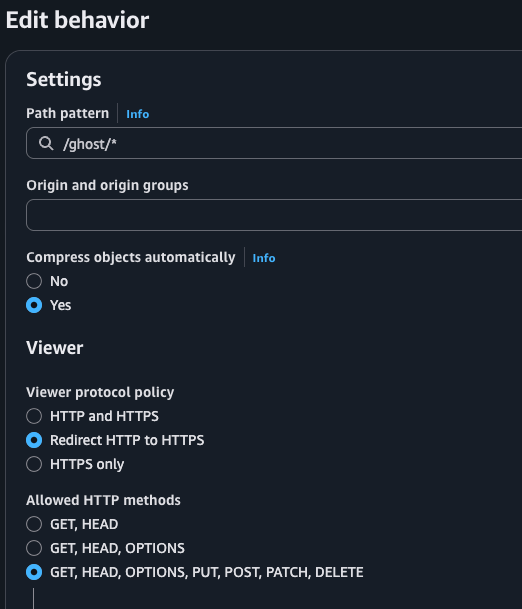
My cloudfront distribution was missing a rule to not cache admin requests. This meant that request to /ghost/* were cached including security tokens passed as URL parameters, this caused intermittent problems with the ghost setup UI and always resulted in the settings page not loading properly. The fix is to create a rule so that CloudFront does not cache any requests.

This ensures that all HTTP operations are not cached:
I also needed to add an Origin request policy to both rules so that nginx forwards the request to ghost based on the hostname passed in the request.

This policy consists of two specific headers:
CloudFront-Forwarded-ProtoHost
As show below, cookies and Query Strings should be passed as is.

Issue 2 - WAF Rules
The next issue was more challenging as it was intermittent, although I soon realized that it was related to longer edits. I had opted in to using WAF rules but didn't realize these were now blocking longer edits to post. I could see the issue was orginating from cloud front by looking at the HTTP response headers:
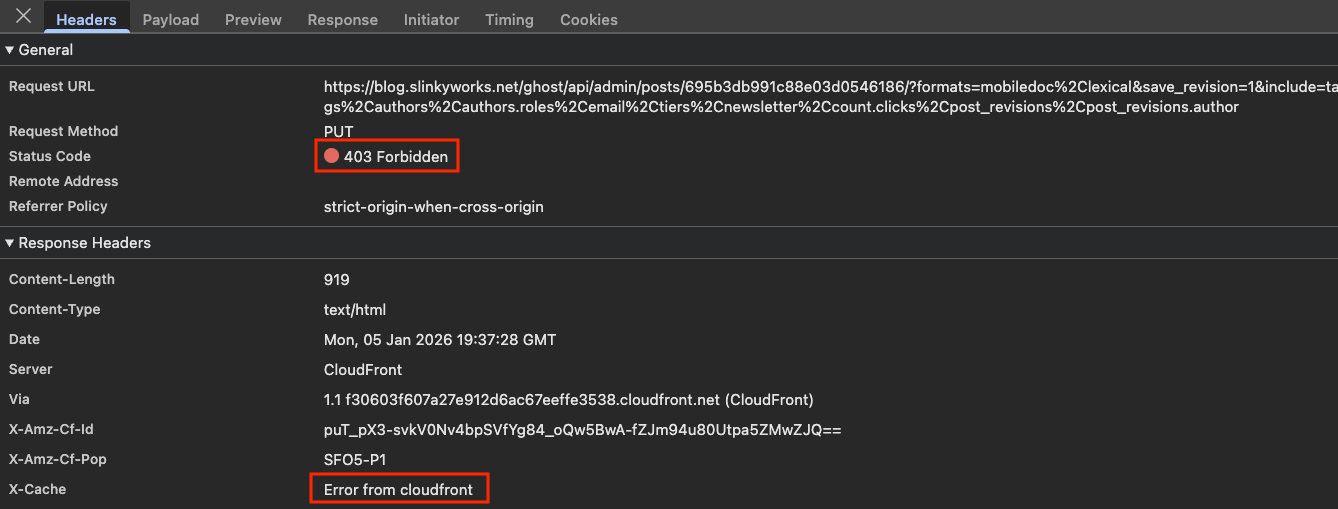
Logging into the AWS console and looking at the WAF dashboard (WAF & Shield) I could see admin post requests were blocked based on the size of the body in the payload.

To address this issue, go to Manage Rules:
- Add Rule
- Custom Rule
- Custom Rule (again)
- Action, set to
Allow - Give it a name
- Inspect (change to URI Path), starts with add:
- /ghost/
- Save rule
- Then make this highest in priority.
That fixed my issues.